Saleplaza BuyKing MCP Server

Official Saleplaza Protocol for Agentic AI

🔌 MODEL CONTEXT PROTOCOL

AI Lion King Buyking

"Claude, ChatGPT! Feel free to use my shopping data!" 🦁

BuyKing MCP Server is a standard (MCP) API server that provides Saleplaza's vast hot deal data for external AI agents to understand and search.
Just ask your AI assistant now. Buyking will directly recommend the perfect deal!

Glama.ai BuyKing MCP Server Badge
BuyKing MCP Server 마스코트 - AI 사자왕 바이킹 Claude ChatGPT 핫딜 연동

AI 도구별 설치 가이드

Step-by-step installation guide to connect BuyKing MCP to major AI tools like Claude Desktop, Cursor, VS Code, and Windsurf.

Claude Desktop: The official desktop app by Anthropic and the most widely used AI assistant

Claude Desktop 1-second Auto Integration Guide

Mac / Linux

Terminal Command

Copy and paste the command below into your terminal to safely and automatically install BuyKing MCP in your Claude Desktop configuration.

Terminal
curl -sL https://saleplaza.com/buyking-mcp-install.sh | bash
Windows

PowerShell Command

Open PowerShell (not Command Prompt) and enter the command below to download and run the installation script.

PowerShell
Invoke-WebRequest -Uri "https://saleplaza.com/buyking-mcp-install.bat" -OutFile "buyking-mcp-install.bat"; .\buyking-mcp-install.bat

Claude Desktop Manual Installation Guide

Open Configuration File

Open the configuration file for Claude Desktop.

bash
# Mac: 터미널에서 실행 code ~/Library/Application\ Support/Claude/claude_desktop_config.json # Windows: 파일 경로 %APPDATA%\Claude\claude_desktop_config.json

Add BuyKing MCP Code

Add the following to the mcpServers section of the file and save.

json
{ "mcpServers": { "buyking": { "command": "npx", "args": [ "-y", "buyking-mcp@latest" ] } } }

Restart Claude

Completely quit the Claude app (Cmd + Q) and run it again.

Check MCP Connection

Check if the 🔌 plug (or hammer) icon is lit at the bottom of the chat window.

Configuration File Example

claude_desktop_config.json
{ "mcpServers": { "buyking": { "command": "npx", "args": [ "-y", "buyking-mcp@latest" ] } } }

Verification

Ask Claude: "Recommend some refreshing sparkling water or cider for summer. Make sure to use the tool to answer!"

BuyKing Face

External LLM / AI Agent Integration Guide

You can directly call the BuyKing MCP server using HTTP JSON-RPC from any LLM framework like LangChain or LlamaIndex.

Step 1

Check Endpoint

BuyKing MCP server provides a Stateless HTTP JSON-RPC endpoint that can be immediately called by any external LLM or framework (e.g., LangChain) without complex local installation.

POST https://buyking.saleplaza.com/message
Step 2

Send Tool Call Request

When the AI model determines that a product search is needed, it sends an HTTP POST request to the server in the standard MCP JSON-RPC format as below.

curl -s -X POST https://buyking.saleplaza.com/message \ -H "Content-Type: application/json" \ -d '{ "jsonrpc": "2.0", "id": 1, "method": "tools/call", "params": { "name": "search_buyking_semantic", "arguments": { "keyword": "무소음 마우스", "sort": "price_asc" } } }'
Step 3

Receive Buyking's Markdown Response

The server returns perfectly formatted Markdown text and inbound links so the AI can use it immediately as an answer. Render this directly in the AI's response chain!

BuyKing MCP 응답 예시 - AI 쇼핑 큐레이터 바이킹

Usage Example

This is an example of searching for "mouse" using BuyKing MCP in LMStudio. You can see that the AI automatically finds and recommends the best hot deals.
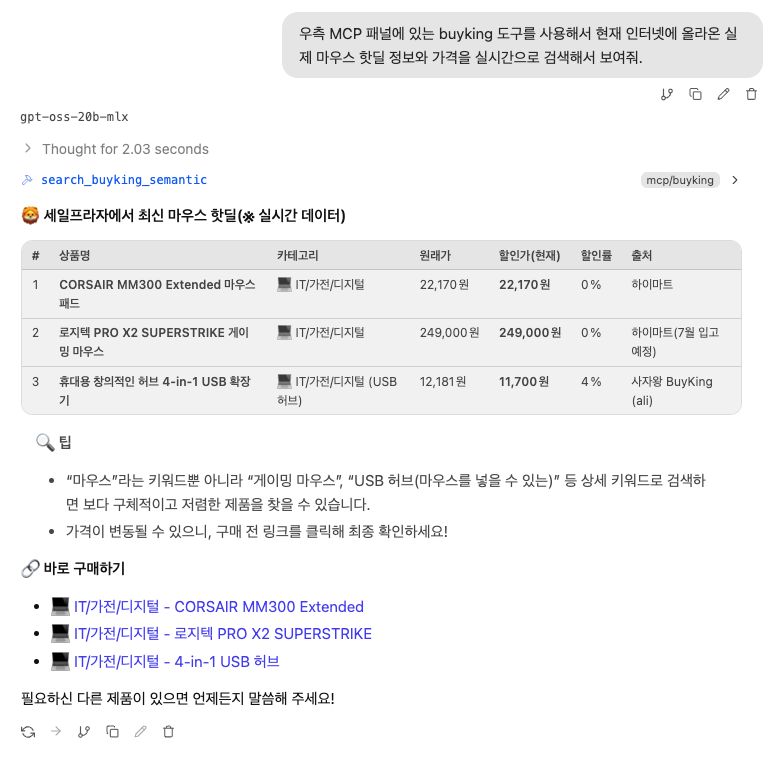
BuyKing MCP search result screenshot in LMStudio
💡 BuyKing MCP search result screenshot in a real usage environment

🦁 Use Saleplaza smarter after installing MCP
🤖 Go to AI Buyking Chatbot →👑 Dealchelin TOP 10 Ranking →📖 About Saleplaza →
BuyKing MCP Server | Integration Guide for Claude & ChatGPT - Saleplaza | Saleplaza